







































Projects
Runs projects: each with a task board of stages, tasks with sub-tasks, dependencies, tags and allocated time, milestones, a budget against what was spent and logged, a burndown, unbilled time to bill, status updates, and an optional view for the customer.
| At a glance | |
|---|---|
| Type | Business module |
| Group | Serve |
| Needs | Nothing. Time comes from Timesheets; billing uses ordinary invoices. |
| Included in | Services & appointments, Trusts & non-profits and others |
| Offered to | Every industry pack |
| Permissions | View projects (projects.view), Manage projects (projects.manage) |
Switching it on
Workspace → Modules → Projects → Enable (needs Manage modules). Projects appears under Serve, and Settings gains project tags and templates.
The project list
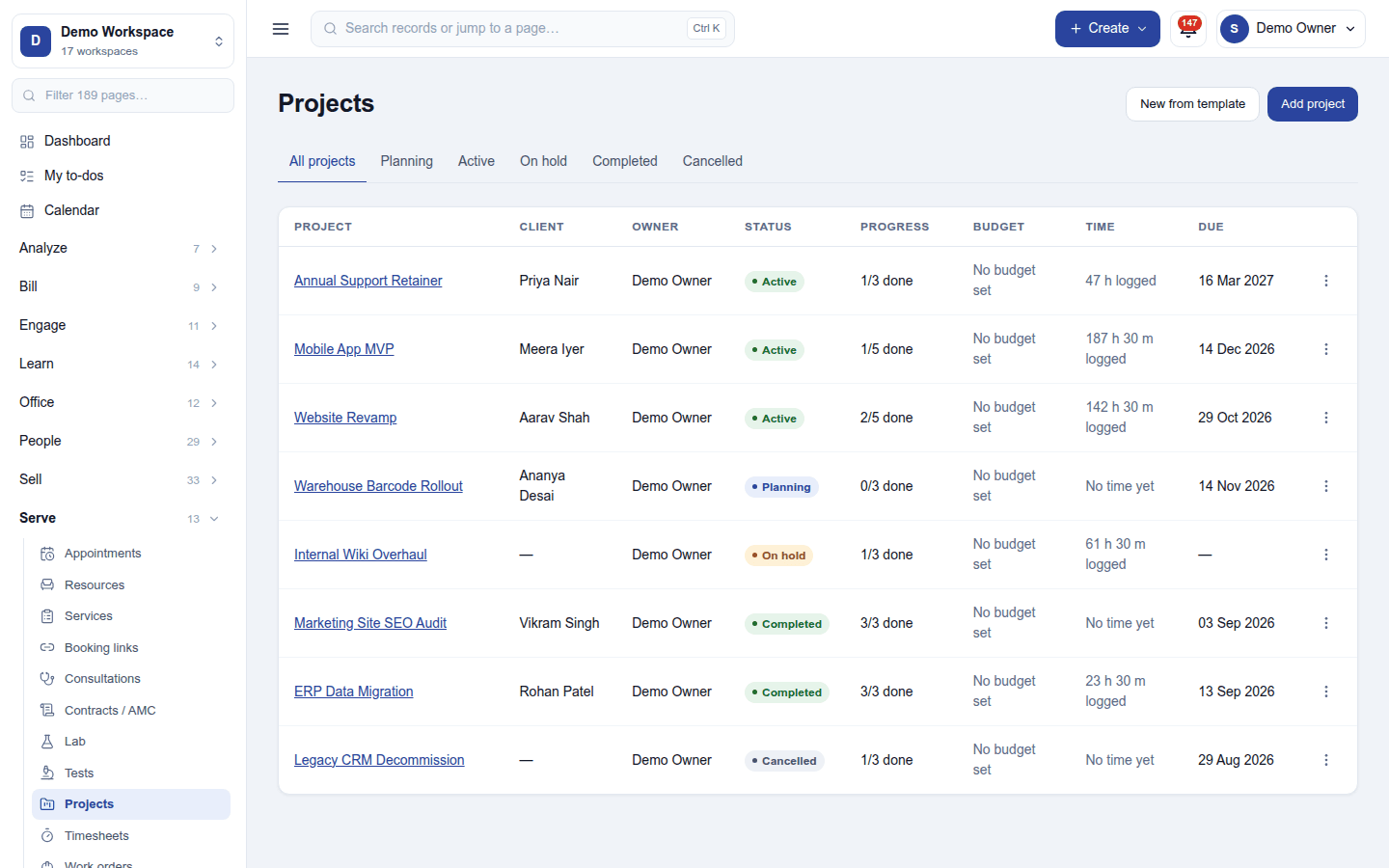
The list shows each project with its client, owner, status, progress (2/5 done), budget, time logged and due date. The tabs filter All projects / Planning / Active / On hold / Completed / Cancelled. Add project starts one (name, client, owner, dates, budget, cost centre); New from template starts one from a saved template with every date moved to the new start. A sales order can start a project too.
A project
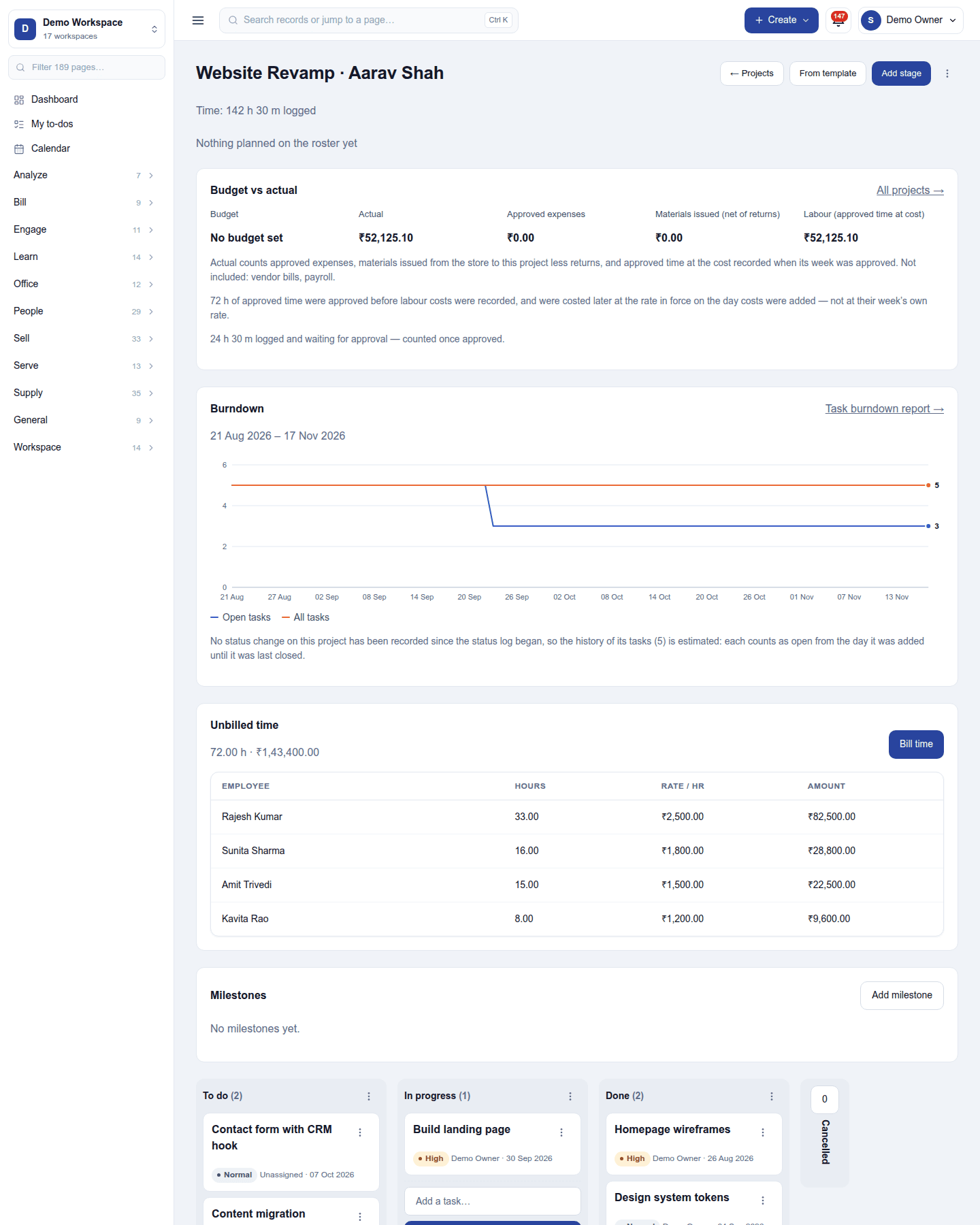
Opening a project shows:
- Budget vs actual: the budget against approved expenses, purchases and labour (logged time at its cost).
- Burndown: open tasks over time against the ideal line, and the task analysis.
- Unbilled time: logged billable time per person, with Bill time to invoice it.
- Milestones, each with its date and, where agreed, the amount billed when it is reached.
- The task board: one column per stage (To do, In progress, Done …, reshaped per project), with a card per task. Drag a card between stages.
A task has its assignee, due date, tags, priority, sub-tasks, dependencies (blocked by another task), allocated time against time logged, custom fields, files, a conversation, and can repeat on a schedule. Post update records a status update: the project's health, a progress percentage, a note, and its task and time counts at that moment. A project can be set to Completed only when no task is still to do or in progress (cancelled tasks never hold it up); completing ends its repeating tasks.
Sharing with the customer: a project can be shared to the customer's portal, where they see its progress and the tasks chosen for them, and can rate a stage.
Settings
Settings → Projects: Project tags (for projects and tasks) and Templates (projects and tasks saved for reuse).
Permissions
| Permission | Allows |
|---|---|
View projects (projects.view) |
See projects, their tasks and boards. |
Manage projects (projects.manage) |
Create projects, plan, assign and move tasks, post updates, bill time and milestones. |
Ready-made automations
| Name | Kind | What it does | Starts |
|---|---|---|---|
| Tell people when a task is assigned to them | Rule | Tells the person a task is assigned to. | On |
| Remind people of tasks due tomorrow | Rule | The day before an open task is due, tells the person it is assigned to. | On |
| Remind the project owner a week before the deadline | Rule | A week before an active project is due, tells its owner. | On |
Turning it off
Projects leaves the menu. Projects, tasks and time are kept.
In the desktop and mobile apps
Not carried.