







































Maintenance
Looks after the machines, vehicles and rooms a business depends on: the asset register, repair tickets, preventive schedules with checklists, and each asset's reliability.
| At a glance | |
|---|---|
| Type | Business module |
| Group | Supply |
| Needs | Nothing |
| Included in | Manufacturing, Hotel / guest house and others |
| Offered to | Every industry pack |
| Permissions | View maintenance (maintenance.view), Manage maintenance (maintenance.manage) |
Switching it on
Workspace → Modules → Maintenance → Enable (needs Manage modules). Maintenance appears under Supply.
The Maintenance screen
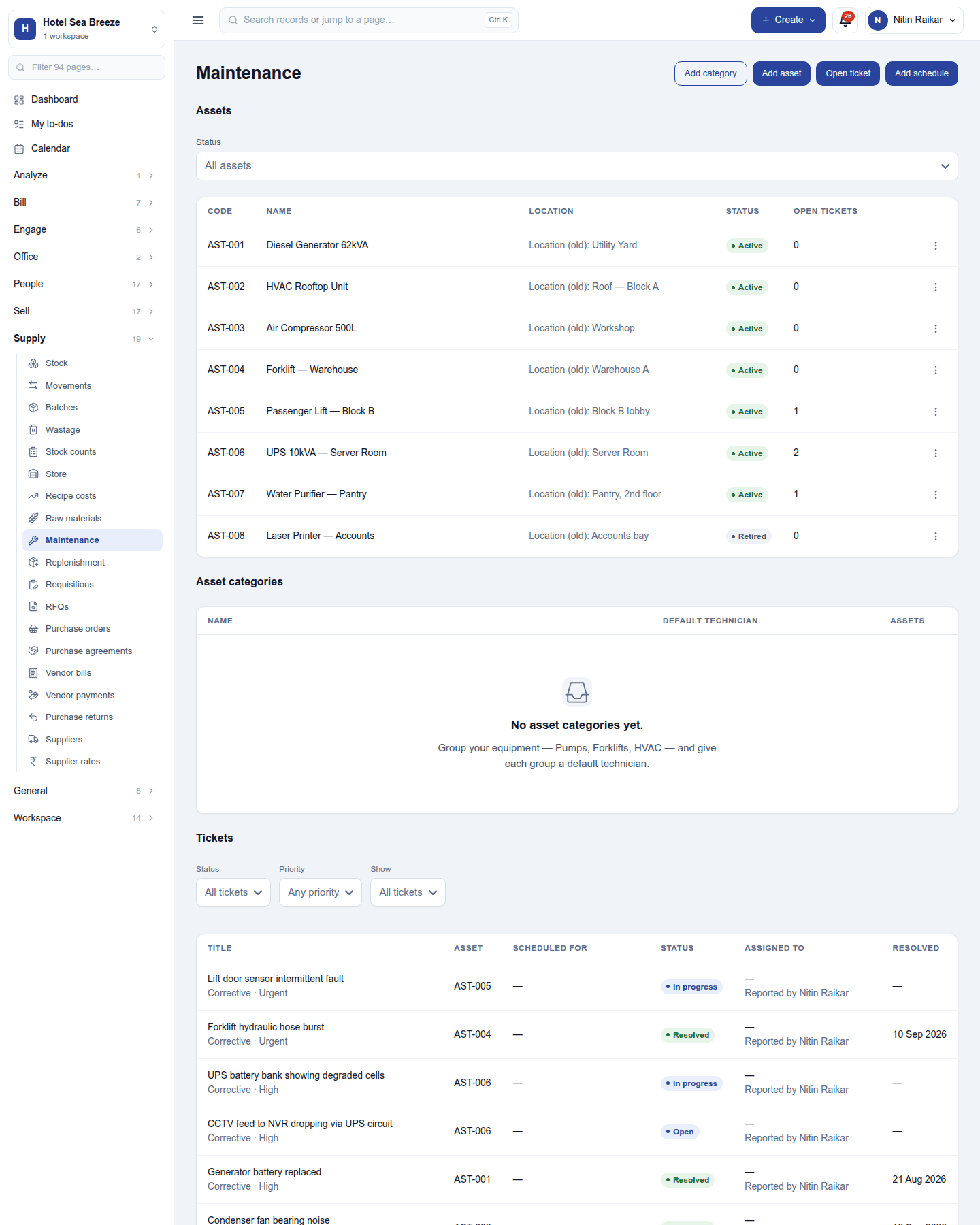
Supply → Maintenance has four parts, with Add category, Add asset, Open ticket and Add schedule in the header.
Assets: each machine, vehicle or room with its code, name, location, status (Active or Retired) and open tickets. An asset records its category, model, serial number, supplier, purchase cost, when it was commissioned, the warranty end date, who uses it, its technician, and, for a mould, which mould it is. A retired asset takes no new tickets but keeps its history.
Asset categories: groups such as Pumps, Forklifts, HVAC, each with a default technician.
Tickets: repairs and services, each with its asset, kind (corrective or preventive), priority, when it is planned, status (Open, In progress, Resolved), who it is assigned to and who reported it. Filter by status, priority and planned dates. Resolve closes a ticket with an optional repair cost; Cancel ticket closes it without one.
Preventive schedules: work that repeats every so many days, weeks, months or years, or after a mould has been used so many times, until a date or a count. Each schedule opens its tickets by itself and can carry a checklist copied onto every ticket it opens. Pause stops it for a while.
Reliability
An asset's Reliability shows its failures, the mean time between failures, the mean time to repair, the latest failure and an estimate of the next. It needs two failures to measure.
Permissions
| Permission | Allows |
|---|---|
View maintenance (maintenance.view) |
See assets, schedules and tickets. |
Manage maintenance (maintenance.manage) |
Add and retire assets, open and work tickets, keep schedules and categories. |
Ready-made automations
| Name | Kind | What it does | Starts |
|---|---|---|---|
| Tell me about a new maintenance request | Rule | Tells the workspace owner when something is reported for repair. | On |
| Remind me before an asset's warranty ends | Rule | A month before an asset's warranty ends, tells its technician and the workspace owner. | On |
Turning it off
The screen leaves the menu and schedules stop opening tickets. Assets and tickets are kept.
In the desktop and mobile apps
Not carried.
Related guides
- Fixed assets (the accounting side), Manufacturing (moulds), Work orders (service jobs for customers)
- Module guides index