







































Knowledge base
The workspace's help centre: articles in Markdown, grouped by category and nested, searched by any word, published for the team or for customers on the portal and a public help centre, with templates, version history and a trash.
| At a glance | |
|---|---|
| Type | Business module |
| Group | Office |
| Needs | Nothing |
| Included in | Repairs & field service, Services & appointments, Website |
| Offered to | Every industry pack |
| Permissions | View knowledge base (knowledge.view), Manage knowledge base (knowledge.manage) |
Switching it on
Workspace → Modules → Knowledge base → Enable (needs Manage modules). Knowledge base appears under Office.
The screen
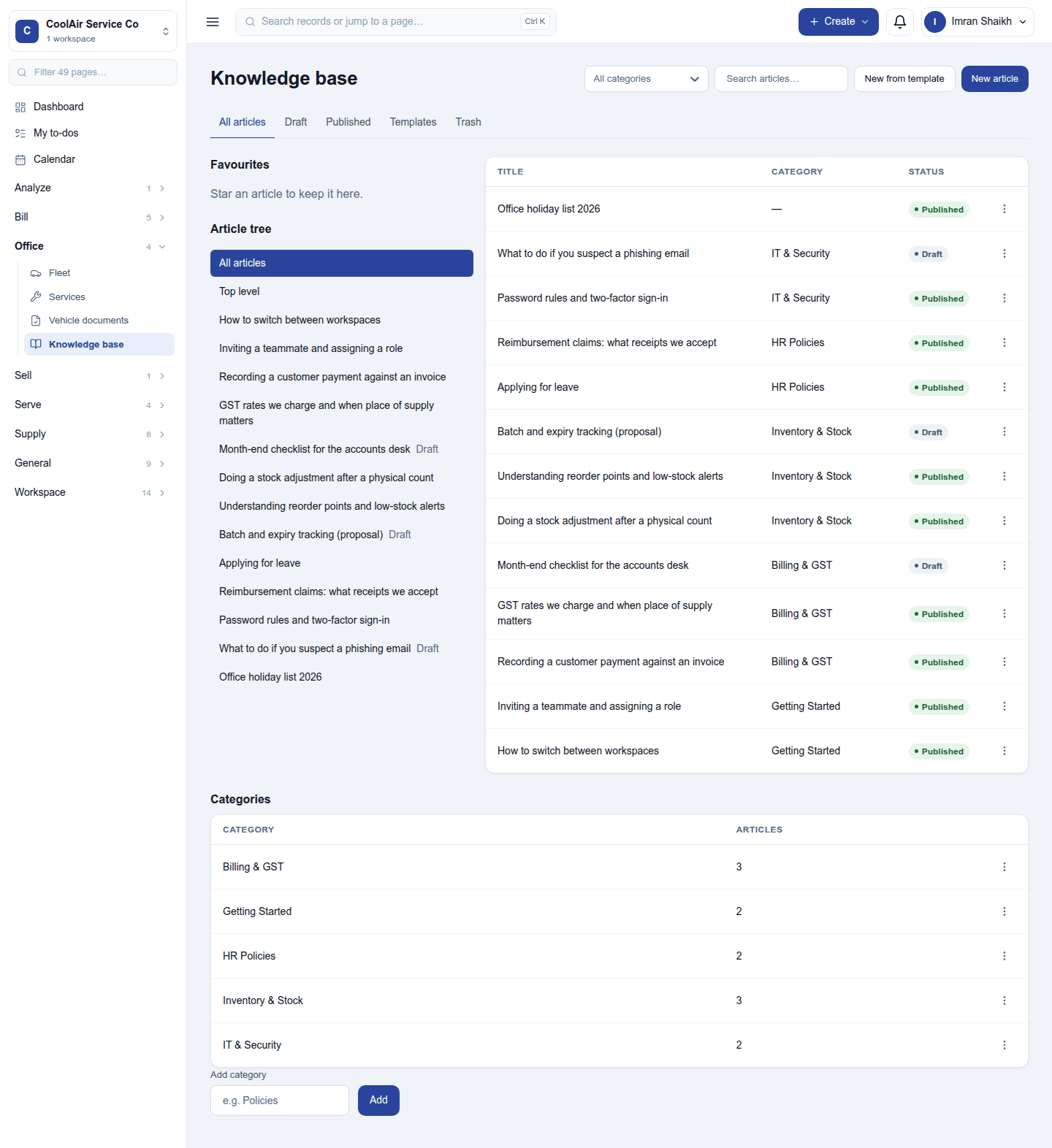
Office → Knowledge base has the article tree on the left (your favourites first, then every article, nested) and the list on the right, with each article's category and status. The tabs filter All articles / Draft / Published / Templates / Trash; filter by category and search by any word. New article writes one; New from template starts from a template. Categories are kept below the tree.
Writing and publishing
An article has a title, a category, a parent (to nest it), and its body in Markdown with pictures and links. It is a draft until published. Each article says who can see it: the team, or customers too (in the customer portal and on the public help centre). Every save keeps a version; an older one can be restored. Deleted articles go to the Trash and can be brought back.
Permissions
| Permission | Allows |
|---|---|
View knowledge base (knowledge.view) |
Read the knowledge base. |
Manage knowledge base (knowledge.manage) |
Write, publish, organise and delete articles. |
Ready-made automations
None. Articles have no moment that needs a person.
Turning it off
The knowledge base leaves the menu, the portal and the public help centre. Articles are kept.
In the desktop and mobile apps
Not carried.